

Appearance
Getting Started
Here you can find various resources to help you develop your own reading system using the Colibrio Reader Framework.
Installation
The Colibrio Reader Framework is written in TypeScript and compiled to ES5 compatible Javascript. The code is organized into a set of UMD modules, which should be compatible with most module loaders.
While using Typescript is optional, we highly recommend that you write your app in TypeScript with "strict" type checking enabled to get full typing support for the framework.
We recommend that you use a module loader/bundler such as Webpack or to build your app. We recommend that you use ES2015 imports to load modules if possible.
Web
Installing the TypeScript framework with NPM. First, you need to add our NPM Registry to your project so you can fetch packages prefixed with @colibrio/.
Inside the root of your project, open the file .npmrc (or create it if it does not exist). Add the following lines:
bash
@colibrio:registry=https://npm.pkg.colibrio.com/
//npm.pkg.colibrio.com/:_authToken=<YOUR_AUTH_TOKEN>
//npm.pkg.colibrio.com/:always-auth=true
where <YOUR_AUTH_TOKEN> should be replaced with the NPM auth token you have received from Colibrio.
Install the dependency:
bash
npm install @colibrio/colibrio-reader-frameworkbash
yarn add @colibrio/colibrio-reader-frameworkbash
pnpm add @colibrio/colibrio-reader-frameworkts
import { ReadingSystemEngine } from '@colibrio/colibrio-reader-framework/colibrio-readingsystem-engine';

// Do something with ReadingSystemEngine
Android
Installing the Kotlin framework with Maven.
Add the Colibrio Maven repository to the project build.gradle file:
kt
allprojects {
    repositories {
        ...
        maven {
            url "https://maven.pkg.colibrio.com"
            credentials {
                username COLIBRIO_MAVEN_USERNAME
                password COLIBRIO_MAVEN_PASSWORD
            }
        }
    }
}
where COLIBRIO_MAVEN_USERNAME and COLIBRIO_MAVEN_PASSWORD should be replaced with the Maven credentials you have received from Colibrio.
Add com.colibrio:reader-framework as a dependency in your module build.gradle file.
kt
dependencies {
  ...
  implementation 'com.colibrio:reader-framework:4.0.0'
}
iOS
Installing the Swift framework.
Prerequisites:
- You need authentication credentials (username and password) to access binaries. If you have not received your credentials yet, please contact Colibrio.
- Create
.netrcfile in your home directory if not present - Add credentials to
.netrcas follows (replace USERNAME and PASSWORD with your credentials you got from Colibrio)
bash
machine spm.pkg.colibrio.com login USERNAME password PASSWORDInstallation:
- In Xcode open Files -> Add Packages...
- Paste package url in the search field
https://bitbucket.org/colibrio/colibrio-pkg-spmTo make the image clickable and expandable, wrap it in a link:
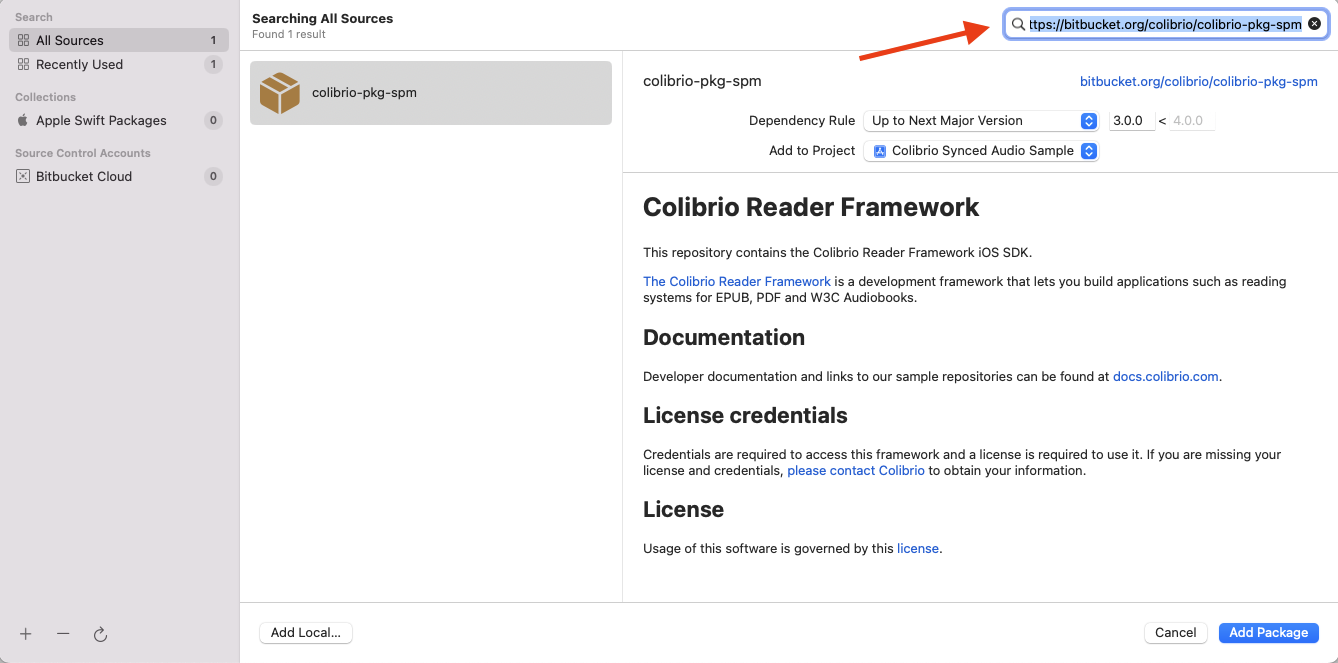
- Set the dependency to version of your choice and click ”Add Package” button